IP-Clos Fabric DHCP Relay Lab
In this Lab we will use the right side of the Lab Topology with a preconfigured IP-Clos Fabric.

Prepare and check your Lab
Configure DHCP-Relay in Fabric
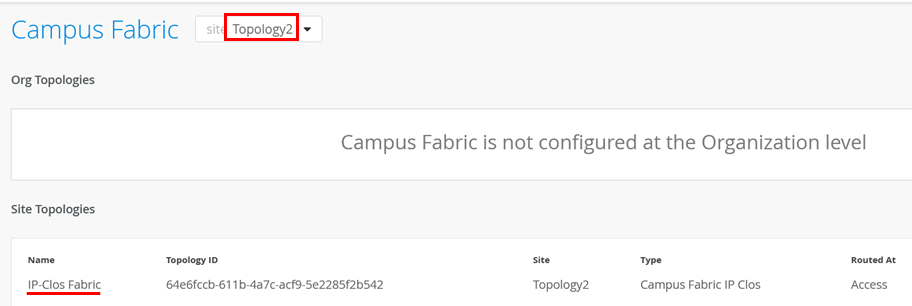
We must configure DHCP-Relay at all. Do NOT configure it locally directly on the Switch. Always use the Fabric dialogue to configure it as part of the Fabric. Go to Organization -> Campus Fabric and select “Topology 2”-Site then click on the “IP-Clos Fabric” similar to below.
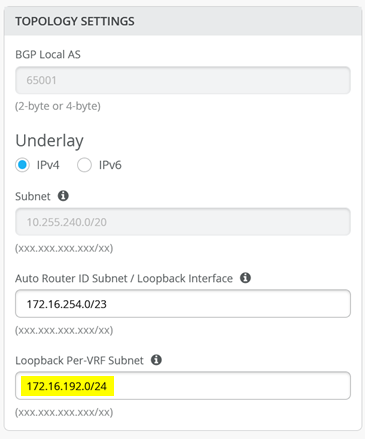
Using the “Edit Configuration” option go to the “Choose Campus Fabric Topology” Panel and check that you have a configured Loopback Pool for DHCP-Relay.
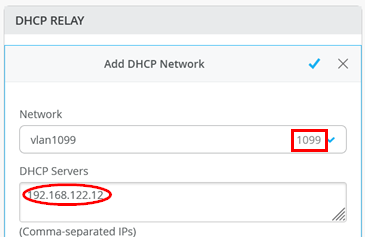
Then configure under “Configure Networks” the VLANs 1099, 1088 and 1033 for DHCP-Relay with the DHCP-Server which is in this Lab the IP-Address 192.168.122.12 ! Example for vlan 1099 is below:
The end result of your configuration should look like the below:
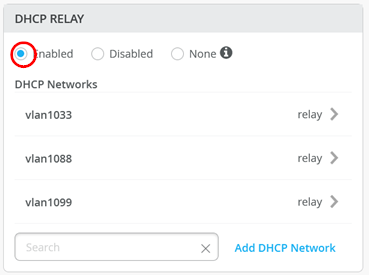
Go further through the next windows with “Continue” until you can “Apply changes” to your fabric
Check Loopback IP-Address exchange with WAN-Router
Check Access1 Switch that you see in status window lo0.1-3 Loopback IP’s. IGNORE lo0.0 as this is underlay for the VTEP’s and control plane.
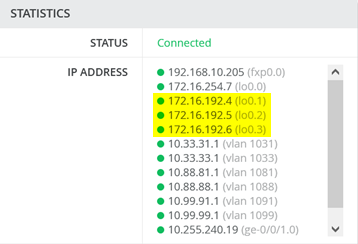
Check Access2 Switch that you see in status window lo0.1-3 Loopback IP’s. IGNORE lo0.0 as this is underlay for the VTEP’s and control plane.

Now check if those IP-Addresses are on the WAN-Router seen and exchanged via BGP-Peering. We use in this lab the routing instance public-int hence they should appear there.
root@wanrouter> show route table public-int.inet.0

public-int.inet.0: 29 destinations, 35 routes (29 active, 0 holddown, 0 hidden)
+ = Active Route, - = Last Active, * = Both

0.0.0.0/0          *[Static/5] 1d 13:23:17
                    >  to 192.168.10.1 via ge-0/0/6.0
10.33.31.0/24      *[BGP/170] 1d 13:05:05, localpref 100, from 10.255.226.5
                      AS path: 64911 65002 65004 65005 65007 I, validation-state: unverified
                    >  to 10.255.224.5 via ge-0/0/4.1031
                       to 10.255.226.5 via ge-0/0/5.1031
                    [BGP/170] 1d 13:05:05, localpref 100
                      AS path: 64911 65001 65004 65005 65007 I, validation-state: unverified
                    >  to 10.255.224.5 via ge-0/0/4.1031
10.33.33.0/24      *[BGP/170] 1d 13:05:05, localpref 100
                      AS path: 64911 65002 65004 65005 65007 I, validation-state: unverified
                       to 10.255.224.5 via ge-0/0/4.1031
                    >  to 10.255.226.5 via ge-0/0/5.1031
                    [BGP/170] 1d 13:05:05, localpref 100
                      AS path: 64911 65001 65004 65005 65007 I, validation-state: unverified
                    >  to 10.255.224.5 via ge-0/0/4.1031
10.88.81.0/24      *[BGP/170] 1d 13:05:05, localpref 100, from 10.255.226.3
                      AS path: 64911 65002 65004 65005 65007 I, validation-state: unverified
                    >  to 10.255.224.3 via ge-0/0/4.1081
                       to 10.255.226.3 via ge-0/0/5.1081
                    [BGP/170] 1d 13:05:05, localpref 100
                      AS path: 64911 65001 65004 65005 65007 I, validation-state: unverified
                    >  to 10.255.224.3 via ge-0/0/4.1081
10.88.88.0/24      *[BGP/170] 1d 13:05:05, localpref 100
                      AS path: 64911 65002 65004 65005 65007 I, validation-state: unverified
                       to 10.255.224.3 via ge-0/0/4.1081
                    >  to 10.255.226.3 via ge-0/0/5.1081
                    [BGP/170] 1d 13:05:05, localpref 100
                      AS path: 64911 65001 65004 65005 65007 I, validation-state: unverified
                    >  to 10.255.224.3 via ge-0/0/4.1081
10.99.91.0/24      *[BGP/170] 1d 13:05:05, localpref 100, from 10.255.226.1
                      AS path: 64911 65002 65004 65005 65007 I, validation-state: unverified
                    >  to 10.255.224.1 via ge-0/0/4.1091
                       to 10.255.226.1 via ge-0/0/5.1091
                    [BGP/170] 1d 13:05:05, localpref 100
                      AS path: 64911 65001 65004 65005 65007 I, validation-state: unverified
                    >  to 10.255.224.1 via ge-0/0/4.1091
10.99.99.0/24      *[BGP/170] 1d 13:05:05, localpref 100
                      AS path: 64911 65002 65004 65005 65007 I, validation-state: unverified
                       to 10.255.224.1 via ge-0/0/4.1091
                    >  to 10.255.226.1 via ge-0/0/5.1091
                    [BGP/170] 1d 13:05:05, localpref 100
                      AS path: 64911 65001 65004 65005 65007 I, validation-state: unverified
                    >  to 10.255.224.1 via ge-0/0/4.1091
10.255.224.0/31    *[Direct/0] 1d 13:23:17
                    >  via ge-0/0/4.1091
10.255.224.0/32    *[Local/0] 1d 13:23:17
                       Local via ge-0/0/4.1091
10.255.224.2/31    *[Direct/0] 1d 13:23:17
                    >  via ge-0/0/4.1081
10.255.224.2/32    *[Local/0] 1d 13:23:17
                       Local via ge-0/0/4.1081
10.255.224.4/31    *[Direct/0] 1d 13:23:17
                    >  via ge-0/0/4.1031
10.255.224.4/32    *[Local/0] 1d 13:23:17
                       Local via ge-0/0/4.1031
10.255.226.0/31    *[Direct/0] 1d 13:23:17
                    >  via ge-0/0/5.1091
10.255.226.0/32    *[Local/0] 1d 13:23:17
                       Local via ge-0/0/5.1091
10.255.226.2/31    *[Direct/0] 1d 13:23:17
                    >  via ge-0/0/5.1081
10.255.226.2/32    *[Local/0] 1d 13:23:17
                       Local via ge-0/0/5.1081
10.255.226.4/31    *[Direct/0] 1d 13:23:17
                    >  via ge-0/0/5.1031
10.255.226.4/32    *[Local/0] 1d 13:23:17
                       Local via ge-0/0/5.1031
172.16.192.7/32    *[BGP/170] 1d 13:23:08, localpref 100
                      AS path: 64911 I, validation-state: unverified
                    >  to 10.255.226.1 via ge-0/0/5.1091
172.16.192.8/32    *[BGP/170] 1d 13:23:09, localpref 100
                      AS path: 64911 I, validation-state: unverified
                    >  to 10.255.226.3 via ge-0/0/5.1081
172.16.192.9/32    *[BGP/170] 1d 13:23:10, localpref 100
                      AS path: 64911 I, validation-state: unverified
                    >  to 10.255.226.5 via ge-0/0/5.1031
172.16.192.10/32   *[BGP/170] 1d 13:05:17, localpref 100
                      AS path: 64911 I, validation-state: unverified
                    >  to 10.255.224.1 via ge-0/0/4.1091
172.16.192.11/32   *[BGP/170] 1d 13:05:09, localpref 100
                      AS path: 64911 I, validation-state: unverified
                    >  to 10.255.224.3 via ge-0/0/4.1081
172.16.192.12/32   *[BGP/170] 1d 13:05:08, localpref 100
                      AS path: 64911 I, validation-state: unverified
                    >  to 10.255.224.5 via ge-0/0/4.1031
192.168.10.0/24    *[Direct/0] 1d 13:23:17
                    >  via ge-0/0/6.0
192.168.10.59/32   *[Local/0] 1d 13:23:17
                       Local via ge-0/0/6.0
192.168.122.0/24   *[Direct/0] 1d 13:23:17
                    >  via ge-0/0/3.0
192.168.122.23/32  *[Local/0] 1d 13:23:17
                       Local via ge-0/0/3.0
In the above example those IP-Addresses are NOT seen. The IP-Addresses 172.16.192.7 to 172.16.192.12 ARE from the needed Pool-range but are configured on the service1/2 Switches if you review it.
You need to check two things:
Are they configured to be exported on the service 1/2 switches that do the BGP-Peering with the WAN-Router? Check the export rule set on service 1/2
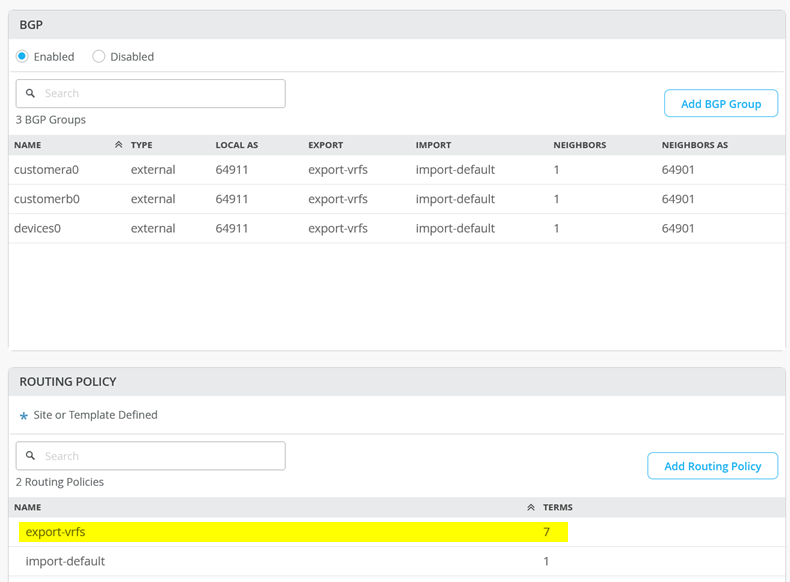
You need to ensure that Host Routes are exported as well hence you can NOT write a Rule 172.16.192.0/19 like the other networks! The rule would have to be 172.16.192.0/19-32 instead as below correct.

If the Fabric was deployed before late June 2024 it needs some additional CLI still. Go to the Switch Template of Topology 2

Go to access1 config for CLI
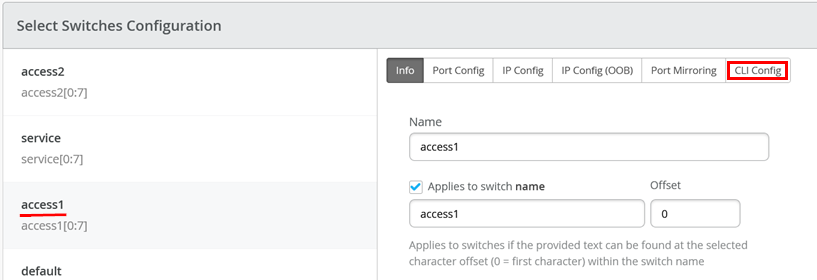
Add the below additional CLI
set groups top policy-options prefix-list irb_networks apply-path "interfaces irb unit <*> family inet address <*>"
set groups top policy-options prefix-list loopbacks apply-path "interfaces lo0 unit <*> family inet address <*>"
set groups top policy-options policy-statement EXPORT-T5-ROUTES term TERM_LO from protocol direct
set groups top policy-options policy-statement EXPORT-T5-ROUTES term TERM_LO from prefix-list loopbacks
set groups top policy-options policy-statement EXPORT-T5-ROUTES term TERM_LO then accept
set groups top policy-options policy-statement EXPORT-T5-ROUTES term TERM_IRB from protocol direct
set groups top policy-options policy-statement EXPORT-T5-ROUTES term TERM_IRB from prefix-list irb_networks
set groups top policy-options policy-statement EXPORT-T5-ROUTES term TERM_IRB then accept
set groups top routing-instances customera protocols evpn ip-prefix-routes export EXPORT-T5-ROUTES
set groups top routing-instances customerb protocols evpn ip-prefix-routes export EXPORT-T5-ROUTES
set groups top routing-instances devices protocols evpn ip-prefix-routes export EXPORT-T5-ROUTES
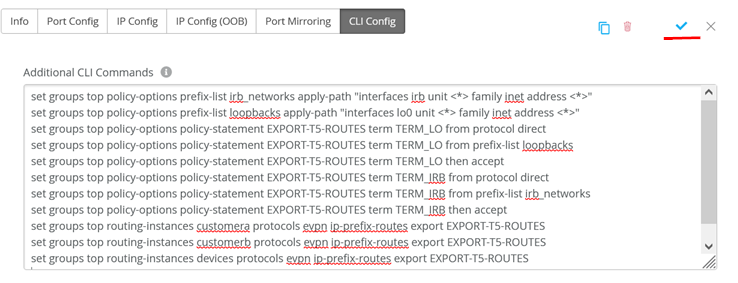
Then go to access2 config for CLI
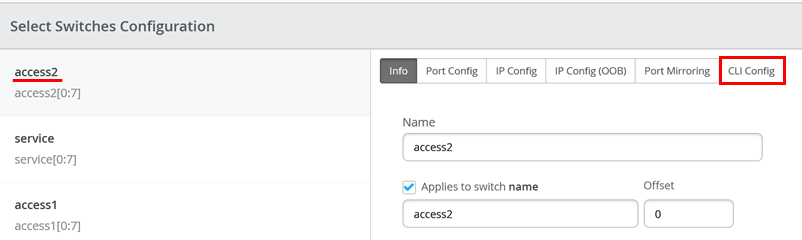
Add the below additional CLI (same as switch1)
set groups top policy-options prefix-list irb_networks apply-path "interfaces irb unit <*> family inet address <*>"
set groups top policy-options prefix-list loopbacks apply-path "interfaces lo0 unit <*> family inet address <*>"
set groups top policy-options policy-statement EXPORT-T5-ROUTES term TERM_LO from protocol direct
set groups top policy-options policy-statement EXPORT-T5-ROUTES term TERM_LO from prefix-list loopbacks
set groups top policy-options policy-statement EXPORT-T5-ROUTES term TERM_LO then accept
set groups top policy-options policy-statement EXPORT-T5-ROUTES term TERM_IRB from protocol direct
set groups top policy-options policy-statement EXPORT-T5-ROUTES term TERM_IRB from prefix-list irb_networks
set groups top policy-options policy-statement EXPORT-T5-ROUTES term TERM_IRB then accept
set groups top routing-instances customera protocols evpn ip-prefix-routes export EXPORT-T5-ROUTES
set groups top routing-instances customerb protocols evpn ip-prefix-routes export EXPORT-T5-ROUTES
set groups top routing-instances devices protocols evpn ip-prefix-routes export EXPORT-T5-ROUTES
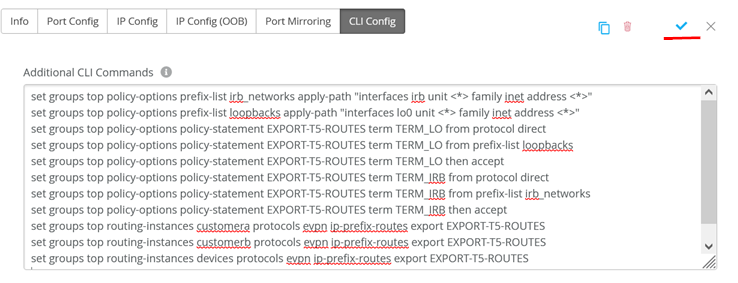
Then go to service config for CLI
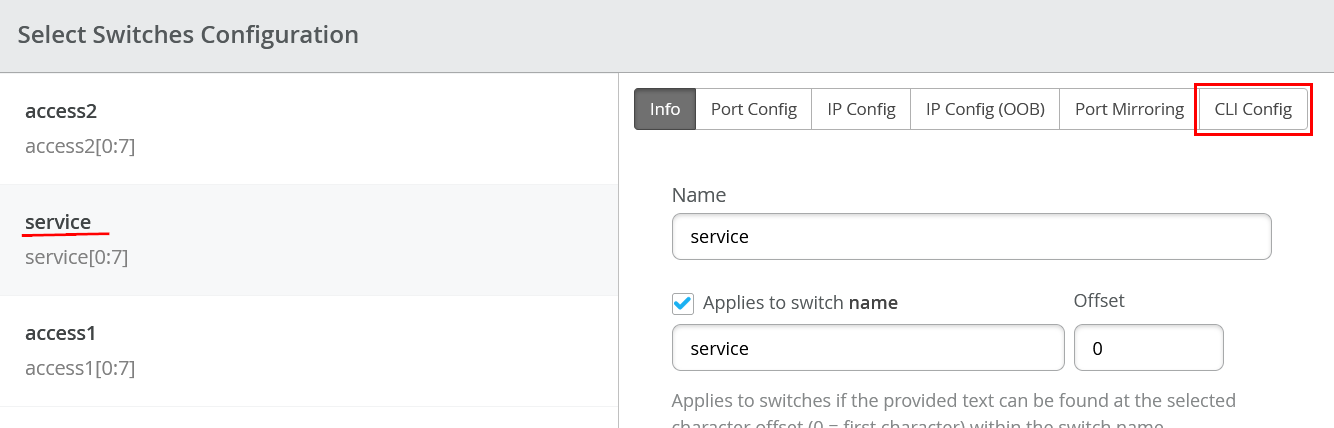
Add the below additional CLI which has two more lines of config then the previous two examples
set groups top policy-options prefix-list irb_networks apply-path "interfaces irb unit <*> family inet address <*>"
set groups top policy-options prefix-list loopbacks apply-path "interfaces lo0 unit <*> family inet address <*>"
set groups top policy-options policy-statement EXPORT-T5-ROUTES term TERM_LO from protocol direct
set groups top policy-options policy-statement EXPORT-T5-ROUTES term TERM_LO from prefix-list loopbacks
set groups top policy-options policy-statement EXPORT-T5-ROUTES term TERM_LO then accept
set groups top policy-options policy-statement EXPORT-T5-ROUTES term TERM_IRB from protocol direct
set groups top policy-options policy-statement EXPORT-T5-ROUTES term TERM_IRB from prefix-list irb_networks
set groups top policy-options policy-statement EXPORT-T5-ROUTES term TERM_IRB then accept
set groups top routing-instances customera protocols evpn ip-prefix-routes export EXPORT-T5-ROUTES
set groups top routing-instances customerb protocols evpn ip-prefix-routes export EXPORT-T5-ROUTES
set groups top routing-instances devices protocols evpn ip-prefix-routes export EXPORT-T5-ROUTES
set groups top policy-options policy-statement EXPORT-T5-ROUTES term TERM_BGP from protocol bgp
set groups top policy-options policy-statement EXPORT-T5-ROUTES term TERM_BGP then accept
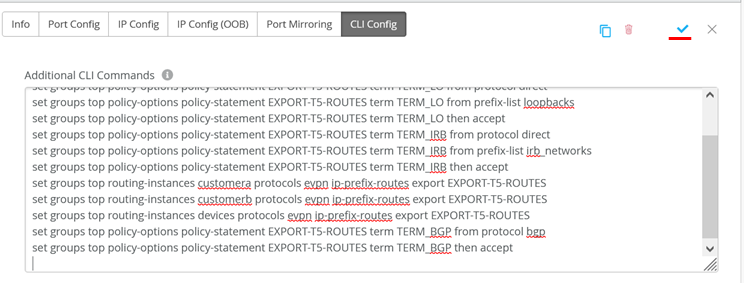
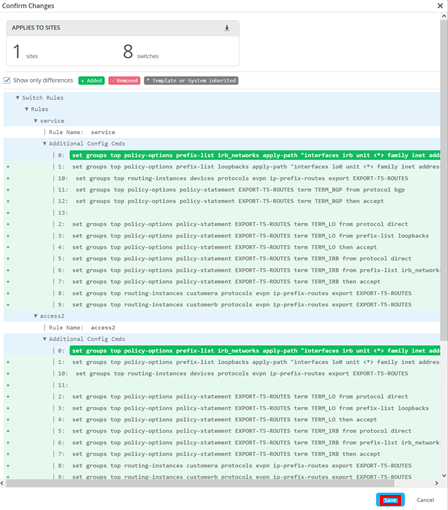
Click on “Save”

Ack the Dialogue
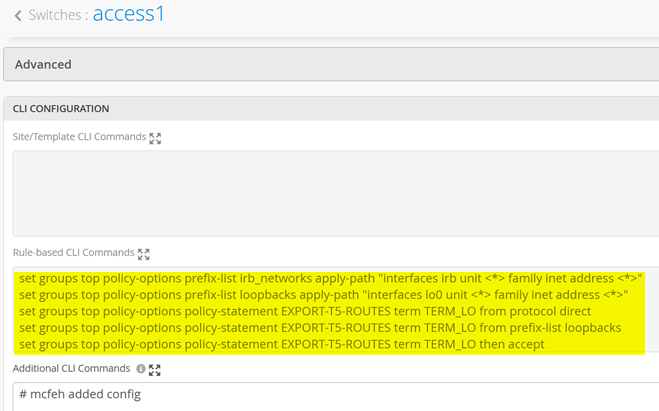
Go to Access1, Access2, Service1 and Service2 Switch to review the config is pushed. Example below is Access1 Switch.
Now review back on WAN-Router that the Loopback IP-Addresses 172.16.192.1 to 172.16.192.6 are finally visible.
root@wanrouter> show route table public-int.inet.0

public-int.inet.0: 35 destinations, 53 routes (35 active, 0 holddown, 0 hidden)
+ = Active Route, - = Last Active, * = Both

0.0.0.0/0          *[Static/5] 1d 14:03:30
                    >  to 192.168.10.1 via ge-0/0/6.0
.
.
.
10.255.226.4/32    *[Local/0] 1d 14:03:30
                       Local via ge-0/0/5.1031
172.16.192.1/32    *[BGP/170] 00:02:05, localpref 100, from 10.255.224.1
                      AS path: 64911 65001 65004 65006 65008 I, validation-state: unverified
                       to 10.255.224.1 via ge-0/0/4.1091
                    >  to 10.255.226.1 via ge-0/0/5.1091
                    [BGP/170] 00:02:05, localpref 100
                      AS path: 64911 65002 65004 65006 65008 I, validation-state: unverified
                    >  to 10.255.226.1 via ge-0/0/5.1091
172.16.192.2/32    *[BGP/170] 00:02:05, localpref 100, from 10.255.224.3
                      AS path: 64911 65001 65004 65006 65008 I, validation-state: unverified
                       to 10.255.224.3 via ge-0/0/4.1081
                    >  to 10.255.226.3 via ge-0/0/5.1081
                    [BGP/170] 00:02:05, localpref 100
                      AS path: 64911 65002 65004 65006 65008 I, validation-state: unverified
                    >  to 10.255.226.3 via ge-0/0/5.1081
172.16.192.3/32    *[BGP/170] 00:02:05, localpref 100, from 10.255.224.5
                      AS path: 64911 65001 65004 65006 65008 I, validation-state: unverified
                       to 10.255.224.5 via ge-0/0/4.1031
                    >  to 10.255.226.5 via ge-0/0/5.1031
                    [BGP/170] 00:02:05, localpref 100
                      AS path: 64911 65002 65004 65006 65008 I, validation-state: unverified
                    >  to 10.255.226.5 via ge-0/0/5.1031
172.16.192.4/32    *[BGP/170] 00:02:07, localpref 100
                      AS path: 64911 65002 65003 65005 65007 I, validation-state: unverified
                       to 10.255.224.1 via ge-0/0/4.1091
                    >  to 10.255.226.1 via ge-0/0/5.1091
                    [BGP/170] 00:02:07, localpref 100
                      AS path: 64911 65001 65003 65005 65007 I, validation-state: unverified
                    >  to 10.255.224.1 via ge-0/0/4.1091
172.16.192.5/32    *[BGP/170] 00:02:07, localpref 100
                      AS path: 64911 65002 65003 65005 65007 I, validation-state: unverified
                       to 10.255.224.3 via ge-0/0/4.1081
                    >  to 10.255.226.3 via ge-0/0/5.1081
                    [BGP/170] 00:02:07, localpref 100
                      AS path: 64911 65001 65003 65005 65007 I, validation-state: unverified
                    >  to 10.255.224.3 via ge-0/0/4.1081
172.16.192.6/32    *[BGP/170] 00:02:07, localpref 100
                      AS path: 64911 65002 65003 65005 65007 I, validation-state: unverified
                       to 10.255.224.5 via ge-0/0/4.1031
                    >  to 10.255.226.5 via ge-0/0/5.1031
                    [BGP/170] 00:02:07, localpref 100
                      AS path: 64911 65001 65003 65005 65007 I, validation-state: unverified
                    >  to 10.255.224.5 via ge-0/0/4.1031
172.16.192.7/32    *[BGP/170] 1d 14:03:21, localpref 100
                      AS path: 64911 I, validation-state: unverified
                    >  to 10.255.226.1 via ge-0/0/5.1091
                    [BGP/170] 00:02:05, localpref 100
                      AS path: 64911 65001 65003 65002 I, validation-state: unverified
                    >  to 10.255.224.1 via ge-0/0/4.1091
172.16.192.8/32    *[BGP/170] 1d 14:03:22, localpref 100
                      AS path: 64911 I, validation-state: unverified
                    >  to 10.255.226.3 via ge-0/0/5.1081
                    [BGP/170] 00:02:05, localpref 100
                      AS path: 64911 65001 65003 65002 I, validation-state: unverified
                    >  to 10.255.224.3 via ge-0/0/4.1081
172.16.192.9/32    *[BGP/170] 1d 14:03:23, localpref 100
                      AS path: 64911 I, validation-state: unverified
                    >  to 10.255.226.5 via ge-0/0/5.1031
                    [BGP/170] 00:02:05, localpref 100
                      AS path: 64911 65001 65003 65002 I, validation-state: unverified
                    >  to 10.255.224.5 via ge-0/0/4.1031
172.16.192.10/32   *[BGP/170] 1d 13:45:30, localpref 100
                      AS path: 64911 I, validation-state: unverified
                    >  to 10.255.224.1 via ge-0/0/4.1091
                    [BGP/170] 00:02:08, localpref 100
                      AS path: 64911 65002 65004 65001 I, validation-state: unverified
                    >  to 10.255.226.1 via ge-0/0/5.1091
172.16.192.11/32   *[BGP/170] 1d 13:45:22, localpref 100
                      AS path: 64911 I, validation-state: unverified
                    >  to 10.255.224.3 via ge-0/0/4.1081
                    [BGP/170] 00:02:08, localpref 100
                      AS path: 64911 65002 65004 65001 I, validation-state: unverified
                    >  to 10.255.226.3 via ge-0/0/5.1081
172.16.192.12/32   *[BGP/170] 1d 13:45:21, localpref 100
                      AS path: 64911 I, validation-state: unverified
                    >  to 10.255.224.5 via ge-0/0/4.1031
                    [BGP/170] 00:02:08, localpref 100
                      AS path: 64911 65002 65004 65001 I, validation-state: unverified
                    >  to 10.255.226.5 via ge-0/0/5.1031
192.168.10.0/24    *[Direct/0] 1d 14:03:30
                    >  via ge-0/0/6.0
192.168.10.59/32   *[Local/0] 1d 14:03:30
                       Local via ge-0/0/6.0
192.168.122.0/24   *[Direct/0] 1d 14:03:30
                    >  via ge-0/0/3.0
192.168.122.23/32  *[Local/0] 1d 14:03:30
                       Local via ge-0/0/3.0
Testing your DHCP-Relay configuration
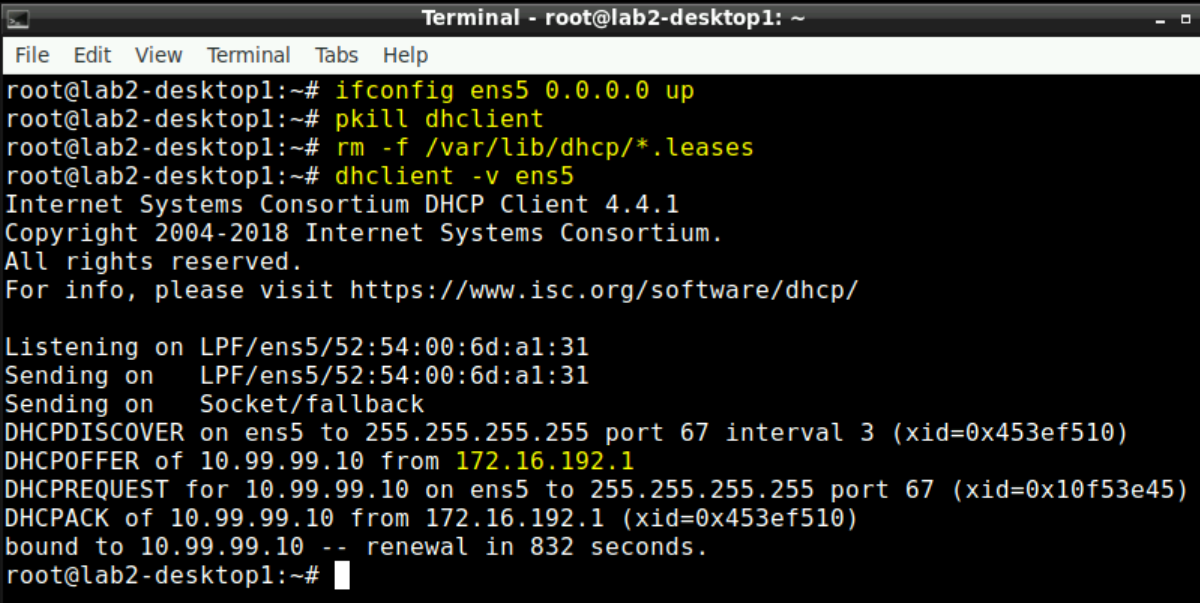
You can go to either desktop1 or desktop2 VM via Apache Guacamole and open a Terminal.
You then need to issue for a test the following 4 lines:
ifconfig ens5 0.0.0.0 up
pkill dhclient
rm -f /var/lib/dhcp/*.leases
dhclient -v ens5
If you made everything right you will get a lease from the DHCP-Server
Warning
It may happen that the reported IP-Address is from an Access Switch where the Client is not connected to (but the same VLAN configured). Ignore this! This is a known limit of vJunos-switch VM not implementing correctly the Junos “set interfaces irb unit <vlan-id> no-dhcp-flood” . Hence, the broadcast of the client is not stopped at the attached Access-Switch and flooded to others as well causing this behaviour.
OPTIONAL: Check the DHCP-Relay server. Login to the Kea1-VM and issue a tcpdump like the below.
tcpdump –vv -eni ens3 port 67

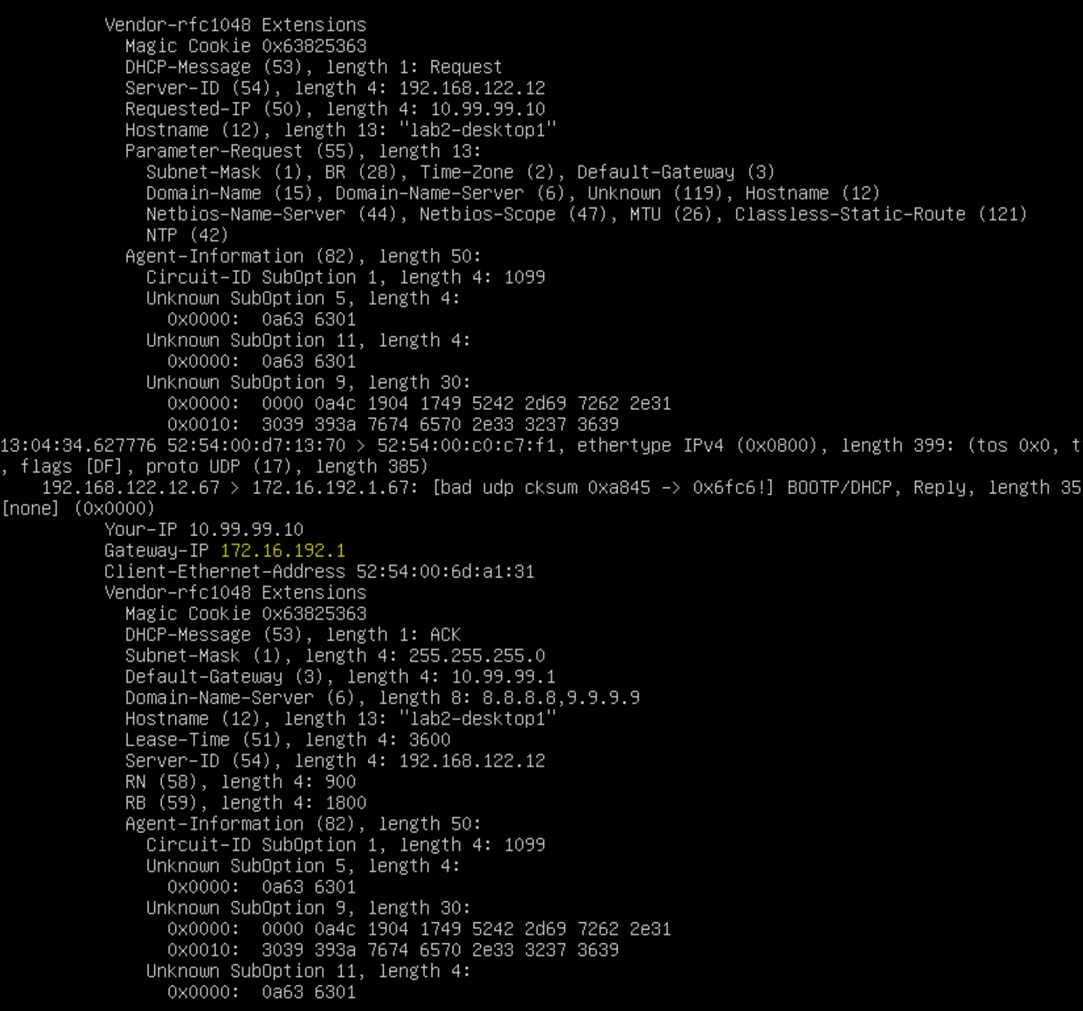
Re-do the 4 lines asking for a DHCP-Lease on your Desktop VM. You should see not more and detailed information like the below.